Showing posts with label API. Show all posts

Monday, 7 October 2024

VB migration from Gen2 to Gen3 > OAUTH Setup for OIC Integration Rest APIs invocation- Gen3

 Hi ,

Below is the steps to migrate VB application from GEN2 to GEN3 and set OAUTH in to it.

1> In OIC Gen2, OIC had the same URLs for design time and runtime APIs. However, in Gen3, OIC has separated its design time and runtime under different URLs.

2> The runtime URL is something like https://oic-dev-environment-ia.integration.us-region-1.ocp.oraclecloud.com/ic/api/xxxxx

3>Design time URL starts with design.integration and always has a query parameter representing the instance, 
such as https://design.integration.us-region-1.ocp.oraclecloud.com/ic/api/xxxxx/?integrationInstance=...

4> The first part of the URL https://design.integration.region.ocp.oraclecloud.com is your rest-server and the rest of the URL integrationInstance=NameOfServiceInstance contains the name of the service instance.

Example: https://design.integration.region.ocp.oraclecloud.com/?integrationInstance=NameOfServiceInstance

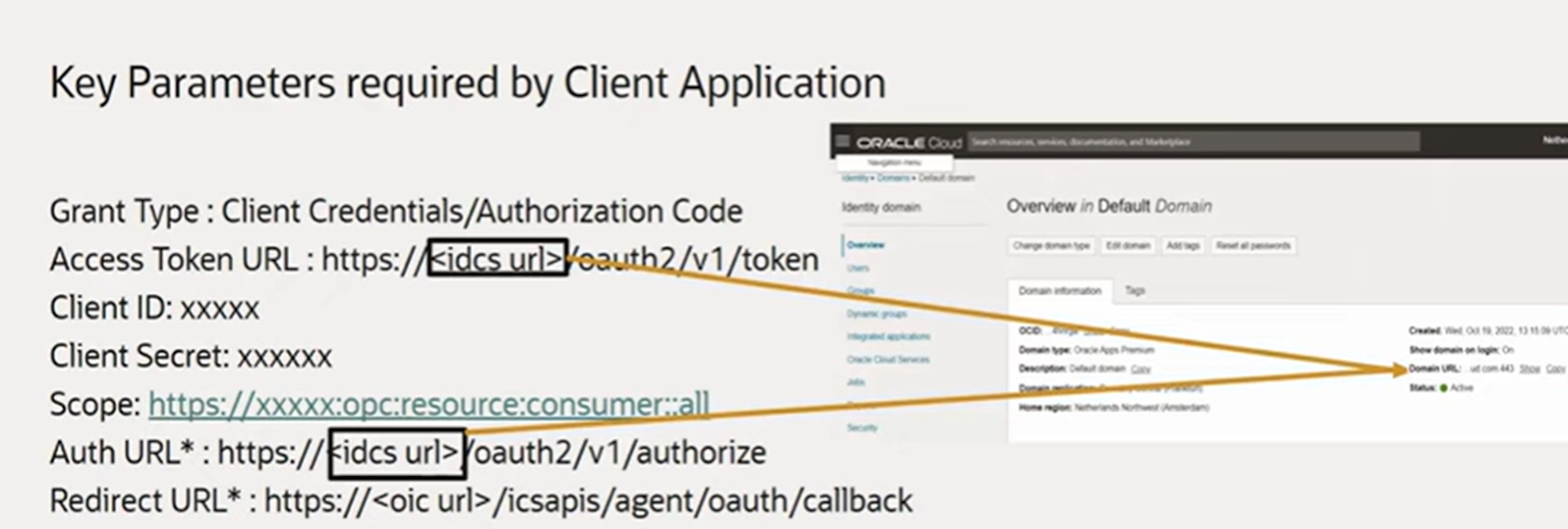
We require below 5 parameters from IAM 

Grant Type
Access Token URL
Client Id
Client Secret
Grant Type


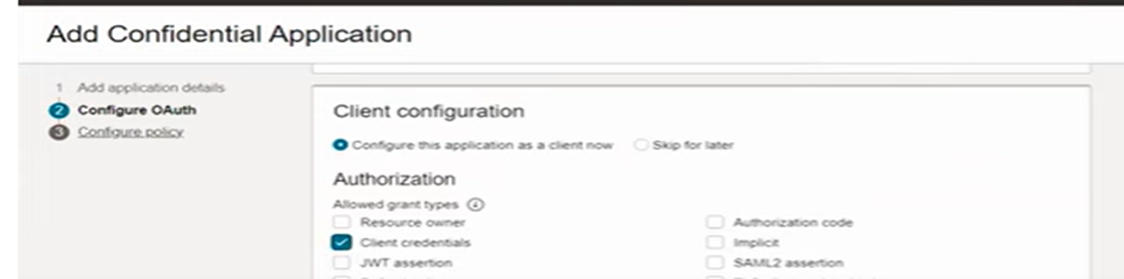
Steps to Get OAUTH Parameters from IAM Console:

Login to :  https:[IDCS URL]/ui/v1/adminconsole

View the Oracle Cloud Services item in the left-hand navigation menu


go to 


For Scope , copy SCOPE value 
Uploading: 134341 of 134341 bytes uploaded.


To get client Id and Secret , see below


All Key Values in Nutshell


All Details:

Token URL : https://idcs-XXXXXX/oauth2/v1/token
Client ID:      1dxxxxxxxxxxxxxxxxxxxxxxx7c
Client Secret :  afxxxxxxxxxxxxxxxxxxxxxxxxxx17
scope: https://XXXXXXXXXXXXXXXXXXXXXXXXXXXXXXX:opc:resource:consumer::all

Now , Export VB application from GEN2 to GEN3 . 

Login to OIC application in GEN3 .


click on Visual Builder and go to service connection and see backend


Create one backend conection, This backend will act as a package or kind of single point of contact for GEN3 credentials.

We can create new service connection and refer this Backend . Or we can leverage this new backend connection in existing service connection. 


use OAUTH2.0 Client Credentials from Authentication:

Instance URL will be Design Time URL of OIC application 

https://*******************cloud.com 


Enter Client Id, Client Secret, Scope, Token URL as we have collected from IAM (see above point)
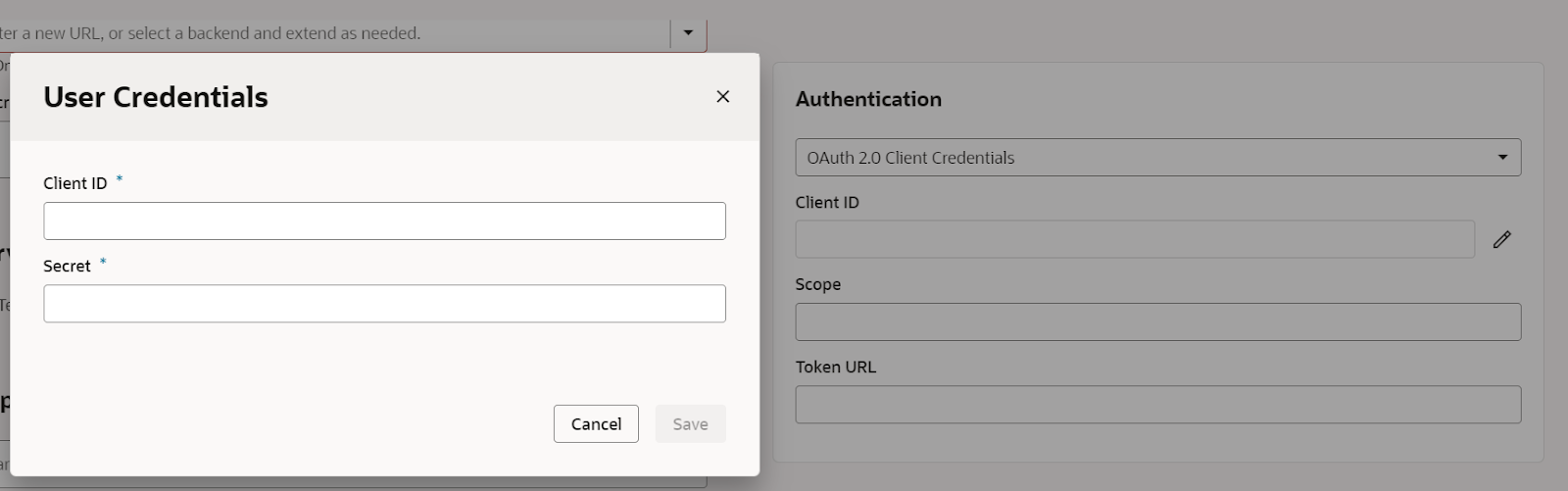


select connection type as "Dynamic, Service does not support CORS"


Now save it and close it.

Now go to service connection, and open existing service connection . 

Change the existing service connection to new BACKEND (which created above. i.e. OICGEN3)


Now go to ENDPOINTS in SERVER itself and enter endpoint, Let suppose we are GET as method to extract all integration details from a particular Lookups then we can leverage below.


For example if you want to call particular lookup which is holding all your integrations in OIC, then call that particular lookup and put name 

Make sure we need to provide 'integrationInstance' Name as "Static Parameter" in Backend itself.


To Retrieve lookup we can use oracle standard format.


Path: /ic/api/integration/v1/lookups/{name}

So our final URL will be like as below 

https://XXXXXXXX.oraclecloud.com/ic/api/integration/v1/lookups/TEST_CONFIG?expand=datarow&onlyData=true&integrationInstance=XXXXX

Run and test it . It will work succesfully.

Same thing we can achieve via POSTMAN , just use CLIENT CREDENTIALS as GRANT TYPE and fill all the information and generate TOKEN. it will work further.

Same Fashion we can use in OIC also, Just enter all information in REST CONNECTION TYPE and put mapping for "integrationInstance" name. It should work.

Thanks.

Happy Learning. 

For More information, please drop your comment here . 

Monday, 29 July 2024

How to Split CLOB column data into different rows - SQL PL SQL - Oracle

  SELECT DISTINCT

        PROJECT_NAME_ALIAS,

        USER_EMAIL,

        REGEXP_SUBSTR(MODULE_NAME, '[^:]+', 1, LEVEL) AS MODULE_NAME,

        LEVEL

    FROM 

        XXUSER_PROJECTS_MODULES

    WHERE 

       PROJECT_NAME_ALIAS like 'A%'

            CONNECT BY 

        REGEXP_SUBSTR(MODULE_NAME, '[^:]+', 1, LEVEL) IS NOT NULL

        AND PRIOR SYS_GUID() IS NOT NULL


        select * from XXUSER_PROJECTS_MODULES

        where project_name_alias like 'A%'


if modules are stored as below 


Thursday, 27 June 2024

How to create dependent LOV in Oracle APEX fusion

 1. Create one lookup table and enter lookup_type column as per need .  For example below.

select LOOKUP_VALUE, lookup_code

from XXXX_APPLICATION_LOOKUP

where lookup_type= 'OFFERINGS'

2. Select column which is based on above "OFFERINGS", select type as "LOV"

3. Go to Next Column which is based on previous column , Step 2. (output of step2)

4. Put Value in any "ATTRIBUTES" say ATTRIBUTE1 in XXXX_APPLICATION_LOOKUP.

That value is based on Master value and will act as Mapping

Say : OFFERING is ERP 

and MODULE is Finance.

so put value in "LOOKUP_TYPE" as "MODULE" and put 

Lookup_value as "Finance"

and in ATTRIBUTE1 as "ERP"

it will create as MAPPING between two datas.

put below query in target LOV (or Child LOV)

where P9_REGION in below query is Name of Master LOV 

Query :


select lookup_value , lookup_code

from XXXX_APPLICATION_LOOKUP

where lookup_type= 'COUNTRY' 

and attribute1 in (select regexp_substr (

           :P9_REGION,

           '[^:]+',

           1,

           level

         ) value

  from  dual

  connect by level <=

    length ( :P9_REGION ) - length ( replace ( :P9_REGION, ':' ) ) + 1)


Friday, 17 May 2024

Calling of subtemplate from Main template in BI Publisher in Oracle Fusion

 Sometimes there are requirement where header and footer are changing and rest content/body of template is same.

For example there are multiple addresses for any parent company.

In that case we can create subtemplate and call that subtemplate in parent template.

Creating Subtemplate:

In RTF template , do below

<?template:MyAddressUS?>
My Company
500 Main Street
Any City, CA 98765
<?end template?>                                                                    
?template:MyAddressIndia?>
My Company
500 Main Street
India
<?end template?>    
Now we can save that template in fusion, Go to oracle fusion

its extension will be .xsb

Now we need to call that template in our main template,
wherever we want to call in the main template

Calling of Subtemplate from Main template:
In the Main template enter the following import statements in the form field or directly
anywhere in the template.

  1. <?import:xdoxsl:///Customer Reports/Templates/Sub_Template_Address_XXX.xsb?>
    
  2. In Main template where you want to show that address, use below Call command
  3. <?call-template:MyAddressUS?>
  4. At runtime, parent template will take care of those path.
  5. To handle parameterized layout , use below command
  6. In the RTF template define a parameter using syntax - 

<?param@begin:ParameterName?>

For example:

<?param@begin:DeptName?>


Happy Learning .


Monday, 13 May 2024

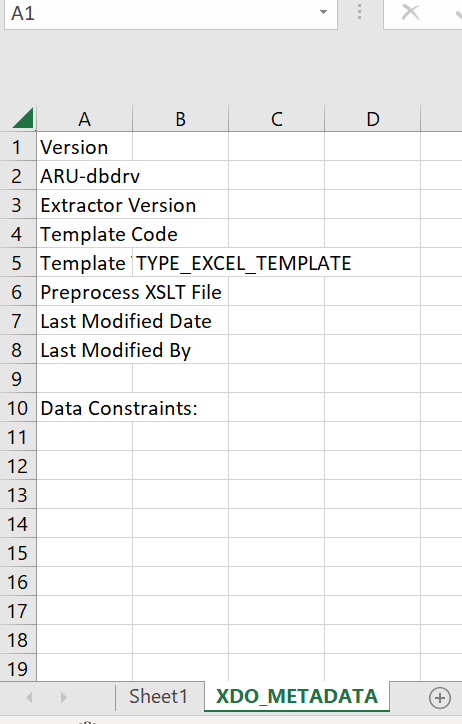
How to create excel template in BI Publisher

 Step1: First create BIP report with SQL query in BI publisher in oracle fusion.

Step2: Download XML data from BIP output.

Step3: Open Excel template 

Step4: Upload XML data into excel template .

Navigation: Go to BI Publisher>Sample XML> Select XML file and click Ok.

Then Click on Field, it will be like as below


Step5: Right click on tab and select unhide


Step 6: Drag and drop all the required column into sheet1


Now to create a group , select the entire row and cells and click on repeating group


select group by for any columns you want to group by.

Run the excel report. It will work . 


Tuesday, 18 August 2020

Calling of OTBI report from WEBSERVICE or API


How to execute OTBI report from WEBSERVICE :

WSDL for analytics report 

https://[YourDomain].fa.em2.oraclecloud.com/analytics-ws/saw.dll/wsdl/v7

Enter this WSDL in SOAPUI Tool 

First of all generate session id to execute it by entering username and password in SAWSESSIONSERVICE in LOGON


The take the session ID and enter into executexmlQuery in  xmlviewservice


Remove all question marks in PAYLOAD and enter session id generated above and report path only 

PAYLOAD be like this :

/***********************

<soapenv:Envelope xmlns:soapenv="http://schemas.xmlsoap.org/soap/envelope/" xmlns:v7="urn://oracle.bi.webservices/v7">

   <soapenv:Header/>

   <soapenv:Body>

      <v7:executeXMLQuery>

         <v7:report>

            <v7:reportPath>/shared/Custom/report_name</v7:reportPath>

            <v7:reportXml></v7:reportXml>

         </v7:report>

         <v7:outputFormat></v7:outputFormat>

         <v7:executionOptions>

            <v7:async></v7:async>

            <v7:maxRowsPerPage></v7:maxRowsPerPage>

            <v7:refresh></v7:refresh>

            <v7:presentationInfo></v7:presentationInfo>

            <v7:type></v7:type>

         </v7:executionOptions>

         <v7:reportParams>

            <!--Zero or more repetitions:-->

            <v7:filterExpressions></v7:filterExpressions>

            <!--Zero or more repetitions:-->

            <v7:variables>

               <v7:name></v7:name>

               <v7:value></v7:value>

            </v7:variables>

            <!--Zero or more repetitions:-->

            <v7:nameValues>

               <v7:name></v7:name>

               <v7:value></v7:value>

            </v7:nameValues>

            <!--Zero or more repetitions:-->

            <v7:templateInfos>

               <v7:templateForEach></v7:templateForEach>

               <v7:templateIterator></v7:templateIterator>

               <!--Zero or more repetitions:-->

               <v7:instance>

                  <v7:instanceName></v7:instanceName>

                  <!--Zero or more repetitions:-->

                  <v7:nameValues>

                     <v7:name></v7:name>

                     <v7:value></v7:value>

                  </v7:nameValues>

               </v7:instance>

            </v7:templateInfos>

            <!--Optional:-->

            <v7:viewName></v7:viewName>

         </v7:reportParams>

         <v7:sessionID>bga66ovite1kntelup8tom880o0nmt4ncealchi0vdv36vqt</v7:sessionID>

      </v7:executeXMLQuery>

   </soapenv:Body>

</soapenv:Envelope>

***********************/

it will give you output 

Now if you want to call with parameters then 

create one presentation variable in OTBI report and assign that variable to column 

and now call that parameter from SOAP UI webservice 


/***************************payload will be like *********/

<soapenv:Envelope xmlns:soapenv="http://schemas.xmlsoap.org/soap/envelope/" xmlns:v7="urn://oracle.bi.webservices/v7">

   <soapenv:Header/>

   <soapenv:Body>

      <v7:executeXMLQuery>

         <v7:report>

            <v7:reportPath>/shared/Custom/report_name</v7:reportPath>

            <v7:reportXml></v7:reportXml>

         </v7:report>

         <v7:outputFormat></v7:outputFormat>

         <v7:executionOptions>

            <v7:async></v7:async>

            <v7:maxRowsPerPage></v7:maxRowsPerPage>

            <v7:refresh></v7:refresh>

            <v7:presentationInfo></v7:presentationInfo>

            <v7:type></v7:type>

         </v7:executionOptions>

         <v7:reportParams>

            <!--Zero or more repetitions:-->

            <v7:filterExpressions></v7:filterExpressions>

            <!--Zero or more repetitions:-->

            <v7:variables>

               <v7:name>p_bu</v7:name>

               <v7:value>xxxx</v7:value>

            </v7:variables>

            <!--Zero or more repetitions:-->

            <v7:nameValues>

               <v7:name></v7:name>

               <v7:value></v7:value>

            </v7:nameValues>

            <!--Zero or more repetitions:-->

            <v7:templateInfos>

               <v7:templateForEach></v7:templateForEach>

               <v7:templateIterator></v7:templateIterator>

               <!--Zero or more repetitions:-->

               <v7:instance>

                  <v7:instanceName></v7:instanceName>

                  <!--Zero or more repetitions:-->

                  <v7:nameValues>

                     <v7:name></v7:name>

                     <v7:value></v7:value>

                  </v7:nameValues>

               </v7:instance>

            </v7:templateInfos>

            <!--Optional:-->

            <v7:viewName></v7:viewName>

         </v7:reportParams>

         <v7:sessionID>bga66ovite1kntelup8tom880o0nmt4ncealchi0vdv36vqt</v7:sessionID>

      </v7:executeXMLQuery>

   </soapenv:Body>

</soapenv:Envelope>

/**********************************************************/

It will give only dedicated output .

Thanks and Enjoy