Showing posts with label Reporting. Show all posts

Wednesday, 3 July 2024

How to start new section in RTF template in oracle fusion

Hi Team, 

If you have requirement where you want to display new page for each invoice then below section is for you. 


Happy Learning. 

<LIST_G_INVOICE>
   <G_INVOICE>
      <BILL_CUST_NAME>Vision, Incusive </BILL_CUST_NAME>
      <TRX_NUMBER>234568</TRX_NUMBER>
      ...
   </G_INVOICE>
   <G_INVOICE>
      <BILL_CUST_NAME>BCD </BILL_CUST_NAME>
      <TRX_NUMBER>234</TRX_NUMBER>
      ...
   </G_INVOICE>
   ...
</LIST_G_INVOICE>
...

Each G_INVOICE element contains an invoice for a potentially different customer. To instruct BI Publisher to start a new section for each occurrence of the G_INVOICE element, add the @section command to the opening for-each statement for the group, using the following syntax:

<?for-each@section:group name?>

where group_name is the name of the element for which you want to begin a new section.

For example, the for-each grouping statement for this example is as follows:

<?for-each@section:G_INVOICE?>

The closing <?end for-each?> tag is not changed.

The following figure shows a sample template for batch reports:

Note:

The G_INVOICE group for-each declaration is still within the body of the report, even though the headers are reset by the command.
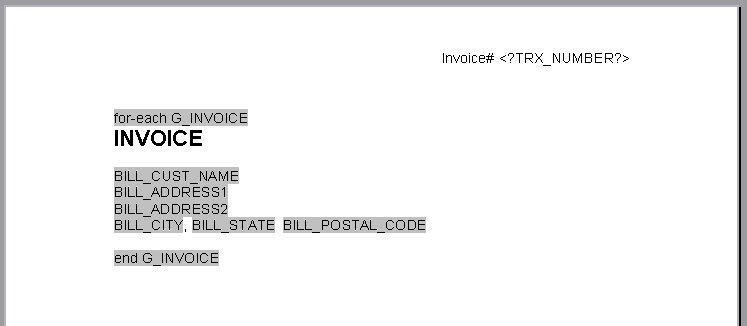
Description of GUID-4782470C-48F5-4F97-B5F6-98F94D1F05F4-default.gif follows


The following table describes the values of the form fields from the template in the previous figure (that shows a sample template for batch reports):

Default Text EntryForm Field Help TextDescription

for-each G_INVOICE

<?for-each@section:G_INVOICE?>

Begins the G_INVOICE group, and defines the element as a Section. For each occurrence of G_INVOICE, a new section is started.

Friday, 17 May 2024

Calling of subtemplate from Main template in BI Publisher in Oracle Fusion

 Sometimes there are requirement where header and footer are changing and rest content/body of template is same.

For example there are multiple addresses for any parent company.

In that case we can create subtemplate and call that subtemplate in parent template.

Creating Subtemplate:

In RTF template , do below

<?template:MyAddressUS?>
My Company
500 Main Street
Any City, CA 98765
<?end template?>                                                                    
?template:MyAddressIndia?>
My Company
500 Main Street
India
<?end template?>    
Now we can save that template in fusion, Go to oracle fusion

its extension will be .xsb

Now we need to call that template in our main template,
wherever we want to call in the main template

Calling of Subtemplate from Main template:
In the Main template enter the following import statements in the form field or directly
anywhere in the template.

  1. <?import:xdoxsl:///Customer Reports/Templates/Sub_Template_Address_XXX.xsb?>
    
  2. In Main template where you want to show that address, use below Call command
  3. <?call-template:MyAddressUS?>
  4. At runtime, parent template will take care of those path.
  5. To handle parameterized layout , use below command
  6. In the RTF template define a parameter using syntax - 

<?param@begin:ParameterName?>

For example:

<?param@begin:DeptName?>


Happy Learning .


Monday, 13 May 2024

How to invoke parametric BIP Report from ESS job

 Hi Team, 

First create Data mode and report with parameters. 

Let suppose 3 parameters

business Unit Id 
From date 
To Date


Now we need to create parametric ESS job with 3 parameters itself. 

Please make sure that order of ESS Job parameters and BIP Data model should be same. 

In ESS Job , it should be 

Business Unit Id

From Date 

To Date.


Please make sure to provide correct path for BIP report also.

In ESS job :
Path should be : /oracle/apps/ess/custom/Financials/XXXX
if report comes under financials and then XXXX

Give exact xdo path for report id 


Happy Learning.
 

Passing date type parameter from an ESS job to BIP SQL data model in oracle fusion application

 Hi Team , 

When you are passing date parameter from ESS Job to BIP report then it is not fetching data due to wrong parameters.

When opening XML it is showing


Although we have given DATE parameter in ESS job as 


Still it is showing in XML document as wrong format date. 

Solution: Make the date format in SQL BIP data model as yyyy-MM-dd 


and in ESS Job also , select Date parameter as yyyy-MM-dd

and then submit ESS job, it will display output also and see XML also.

It will display correct output. 

Thanks and Happy Reading.


How to use Date function in excel BI Publisher


Formatting Dates

Excel cannot recognize canonical date format. If the date format in the XML data is in canonical format, that is, YYYY-MM-DDThh:mm:ss+HH:MM, you must apply a function to display it properly.

One option to display a date is to use the Excel REPLACE and SUBSTITUTE functions. This option retains the full date and timestamp. If you only require the date portion in the data (YYY-MM-DD), then another option is to use the DATEVALUE function. The following example shows how to use both options.

Example: Formatting a Canonical Date in Excel

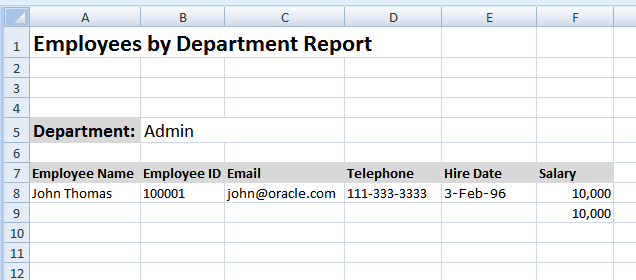
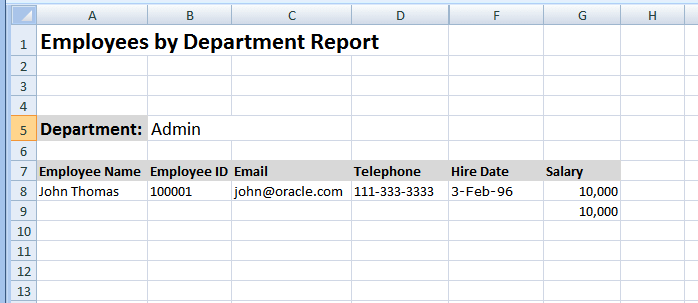
Using the Employee by Department template and data from the first example, this procedure adds the HIRE_DATE element to the layout and displays the date as shown in Column E of Figure 6-18.

Figure 6-18 The Employee by Department Template Showing the Hire Date

Description of Figure 6-18 follows
Description of "Figure 6-18 The Employee by Department Template Showing the Hire Date"

To format the date:

  1. Add a column to the table in your layout for HIRE_DATE.

  2. In the table row where the data is to display, use the Template Builder to insert the HIRE_DATE field.

    Note:

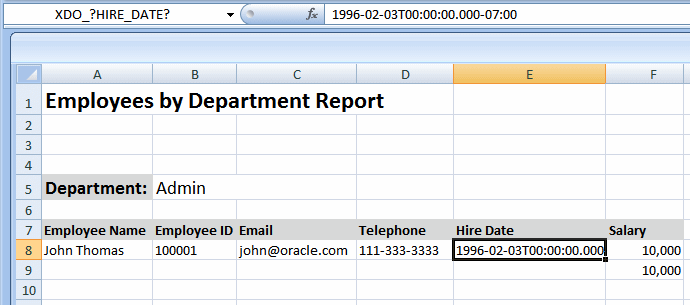
    If you are not using the Template Builder, copy and paste a sample value for HIRE_DATE from the XML data into the cell that is to display the HIRE_DATE field. For example:

    Copy and paste

    1996-02-03T00:00:00.000-07:00

    into the E8 cell.

    Assign the cell the defined name XDO_?HIRE_DATE? to map it to the HIRE_DATE element in the data.

    The inserted field is shown in Figure 6-19.

    Figure 6-19 Inserting the HIRE_DATE Field

    Description of Figure 6-19 follows
    Description of "Figure 6-19 Inserting the HIRE_DATE Field"

    If you do nothing else, the HIRE_DATE value is displayed as shown. To format the date as "3-Feb-96", you must apply a function to that field and display the results in a new field.

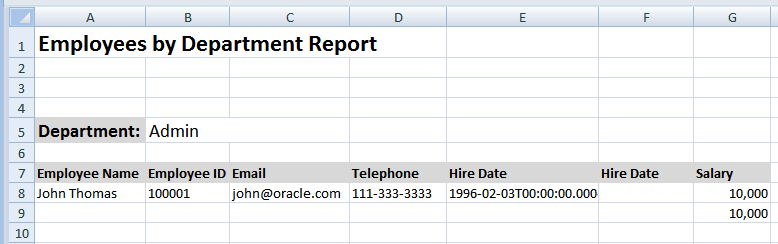
  3. Insert a new Hire Date column. This is now column F, as shown in Figure 6-20.

    Figure 6-20 The New Hire Date Column in Column F

    Description of Figure 6-20 follows
    Description of "Figure 6-20 The New Hire Date Column in Column F"

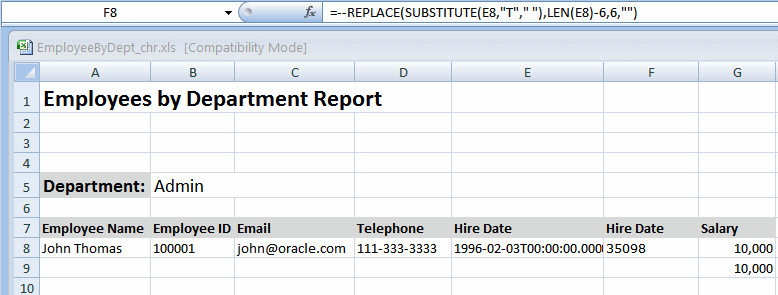
  4. In the new Hire Date cell (F8), enter one of the following Excel functions:

    • To retain the full date and timestamp, enter:

      =--REPLACE(SUBSTITUTE(E8,"T"," "),LEN(E8)-6,6,"")
      
    • To retain only the date portion (YYY-MM-DD), enter:

      =DATEVALUE(LEFT(E8,10))
      

    Notice that in both functions, "E8" refers to the cell that contains the value to convert.

    After you enter the function, it populates the F8 cell as shown in Figure 6-21.

    Figure 6-21 Hire Date Cell (F8) Populated

    Description of Figure 6-21 follows
    Description of "Figure 6-21 Hire Date Cell (F8) Populated"

  5. Apply formatting to the cell.

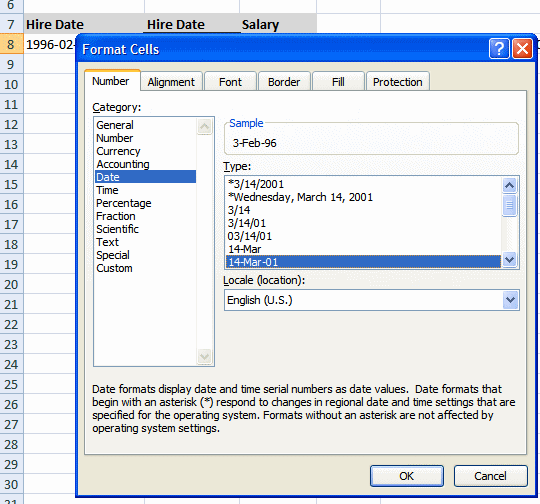
    Right-click the F8 cell. From the menu, select Format Cells. In the Format Cells dialog, select Date and the desired format, as shown in Figure 6-22.

    Figure 6-22 Applying the Format for the Date in the Format Cells Dialog

    Description of Figure 6-22 follows
    Description of "Figure 6-22 Applying the Format for the Date in the Format Cells Dialog"

    The sample data in the F8 cell now displays as 3-Feb-96.

  6. Hide the E column, so that report consumers do not see the canonical date that is converted.

    Figure 6-23 shows the template with column E hidden.

How to create excel template in BI Publisher

 Step1: First create BIP report with SQL query in BI publisher in oracle fusion.

Step2: Download XML data from BIP output.

Step3: Open Excel template 

Step4: Upload XML data into excel template .

Navigation: Go to BI Publisher>Sample XML> Select XML file and click Ok.

Then Click on Field, it will be like as below


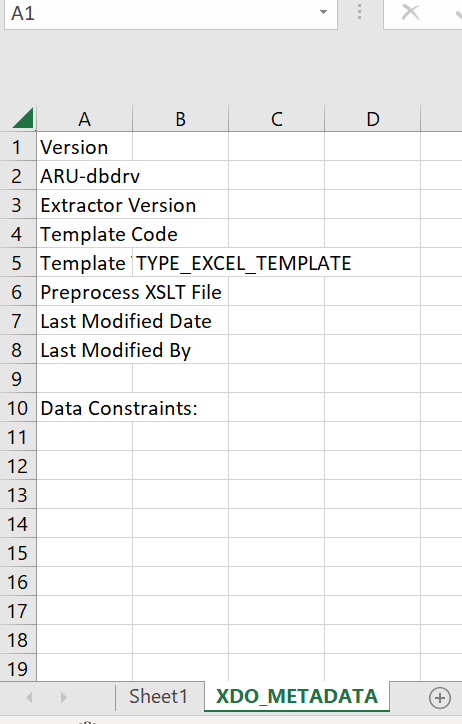
Step5: Right click on tab and select unhide


Step 6: Drag and drop all the required column into sheet1


Now to create a group , select the entire row and cells and click on repeating group


select group by for any columns you want to group by.

Run the excel report. It will work . 


Wednesday, 8 May 2024

How to use Format-number function with if else condition in rtf

If User want to show in two different columns, Debit and credit columns then 


Debit column will be :

 <?if: CD_TRX_AMOUNT>=0?>

<?format-number(CD_TRX_AMOUNT,"### ,###.00")?>

<?end if?>

<?if: CD_TRX_AMOUNT<0?>

<?''?>

<?end if?>


Credit column will be:

<?if: CD_TRX_AMOUNT<0?>
<?format-number(CD_TRX_AMOUNT,"-### ,###.00")?>
<?end if?>
<?if: CD_TRX_AMOUNT>=0?>
<?''?>
<?end if?>

If in same column then 
<?if: CF_TOTAL>=0?>
<?format-number(CF_TOTAL,"### ,###.00")?>
<?end if?>
<?if: CF_TOTAL<0?>
<?format-number(CF_TOTAL,"-### ,###.00")?>
<?end if?>

Monday, 1 April 2024

How to send mail in CC in BIP bursting query

 We can use Parameter2 for sending mail in CC.

But if you want to give access to user for the same then create a lookup and define emails in "DESCRIPTION" of that lookup. 

for example :

abc@gmail.com,def@gmail.com, cef@gmail.com

and call that lookup in BI bursting query . 


It will work 


   (Select description from fnd_lookups where lookup_type='XXX EMAIL CC INV PRINT' and rownum=1)   PARAMETER2,


How to send external attachment with invoices in Oracle Fusion

 Please follow the below steps and retry running the Print Receivables job after.

Please pass the following SQL Query in the Transaction Delivery Bursting > Attachment tab.
Attachment Repository = FA_UCM_PROVISIONED


SQL Query: 
-----------------
SELECT del.customer_trx_id || '_' || del.payment_schedule_id AS "KEY",
doc.DM_VERSION_NUMBER AS "ATTACHMENT_ID"
FROM AR_BPA_DELIVERY_DETAILS del,
fnd_attached_documents att,
FND_DOCUMENTS_VL doc
WHERE att.entity_name = 'RA_CUSTOMER_TRX_ALL'
AND att.pk1_value = TO_CHAR(del.CUSTOMER_TRX_ID)
AND doc.DOCUMENT_ID =att.DOCUMENT_ID
AND att.Category_Name IN
(SELECT Lookup_Code
FROM Fnd_Lookups
WHERE LOOKUP_TYPE = 'AR_PRINT_ATTACHMENT_CATEGORIES'
AND ENABLED_FLAG = 'Y'
AND (TRUNC(SYSDATE) BETWEEN nvl(Start_Date_Active,TRUNC(SYSDATE)) AND nvl(End_Date_Active,TRUNC(SYSDATE)))
)


The Print Receivables Transactions process prints transaction attachments that satisfy the following criteria:


  • The transaction delivery method is Paper or Email.
  • The attachment is in PDF format.
  • The attachment is attached to the transaction header.
  • The attachment category is defined as an active lookup code of the AR_PRINT_ATTACHMENT_CATEGORIES lookup type (Categories of Attachments to be Printed).

Wednesday, 27 March 2024

How to pass values in lexical parameters in BIP seeded report

1/ First open the SQL Query 

 2/ If your query is like 

 Select abc, def, ghi 
from ap_invoice 
 &FROM_clause 
Where &WHERE_Clause 
p=q 
and m=t 
&ORDERBY_Clause 

 so while running the BI report in fusion please pass on below parameter: 

 &FROM_CLAUSE value will be ,ap_invoices_all or value can be any valid table name exist in entire query. 
 &WHERE_Clause value will be 1=1 and
&ORDERBY_Clause  value will be order by 1

In same fashion we can pass on lexical parameters and see how our query is and after passing parameters how it should look like in real . 

One more example :

SELECT gcc.CODE_COMBINATION_ID,
GCC.ATTRIBUTE_CATEGORY,
gcc.segment1 seg1,
gcc.segment2 seg2,
gcc.segment3 seg3,
gcc.segment4 seg4,
gcc.segment5 seg5,
&VSH_SELECT account
FROM GL_CODE_COMBINATIONS GCC
WHERE gcc.CHART_OF_ACCOUNTS_ID = 9090
AND &VSH_WHERE
&VSH_SELECT value will be null
&VSH_WHERE value will be 1=1